Signed and trusted processes do not always exhibit safe behavior. In this article we examine the detection and prevention of processes launched through vmtoolsd.exe via VMware Guest Operations with CrowdStrike Falcon — covering endpoint telemetry, hunting queries, a recommended Custom IOA, and tuning steps.
Modern EDR solutions move beyond the signature-based detections of classic antivirus and holistically analyze the behavior generated on the endpoint. When process creation, parent-child relationships, command line parameters, file system activity, network connections, registry changes, and user context are all evaluated together, much stronger attack visibility is achieved.
However, there is still one critical area in EDR architecture that requires attention: the abuse of processes that are digitally signed and considered trusted within enterprise environments. Because these processes are used for legitimate purposes by the operating system, management tools, or virtualization platforms, they may not be considered high-risk on their own. This situation creates a significant advantage for attackers, because behavior initiated under a trusted process can look like ordinary operational activity when context analysis is not performed.
In this article I examine the abuse of Guest Operations via vmtoolsd.exe, a component of VMware Tools, from the perspective of CrowdStrike Falcon. In tests carried out in a controlled lab environment, I cover how commands pushed from the vCenter/ESXi layer into a guest VM leave telemetry on Falcon, which queries can be used to track them, and how a Custom IOA rule can be designed to catch unexpected child processes started under the vmtoolsd.exe parent process.
The VMware Tools Case
VMware Tools is a critical component that provides integration between the guest operating system and the hypervisor/vCenter layer. On Windows guest operating systems the VMware Tools daemon component appears as vmtoolsd.exe. Under normal circumstances this process is used for management functions such as time synchronization, guest information collection, tool integration, and Guest Operations.
When the Guest Operations APIs are used, it is possible to start processes inside a guest VM from vCenter or ESXi, list processes, perform guest file operations, or validate credentials. This behavior can occur without connecting to the guest operating system through RDP or using classic protocols such as PsExec/WinRM/SMB. For this reason, the primary indicator of the activity on the endpoint is most often a child process starting under the vmtoolsd.exe parent process.
In this scenario, an attacker or an authorized automation account with Guest Operations permissions can launch commands inside a guest VM. The command might be a benign administrative script, or it might be a malicious post-exploitation behavior. From a detection standpoint, the critical point is which child process runs under vmtoolsd.exe, with what command line, and in which user context.
Why CrowdStrike and Other EDR Platforms May Miss This Activity
This behavior does not always generate a native alert. There are several reasons for this:
- vmtoolsd.exe is digitally signed and is a process considered normal in enterprise VMware environments.
- The process launched via Guest Operations may not produce the pattern of classic remote execution protocols such as RDP, WinRM, SMB, or PsExec.
- Even if the EDR agent sees the process telemetry inside the guest VM, it may not automatically correlate it with the API call on the vCenter/ESXi side.
- If the child process launched under vmtoolsd.exe executes a benign command, the behavioral risk score may not exceed the native detection threshold.
- Backup, VCF, cloud management, or automation accounts may also use Guest Operations APIs for legitimate purposes; therefore, seeing only the API call is not sufficient for an alert.
Detection Approach from the CrowdStrike Falcon Perspective
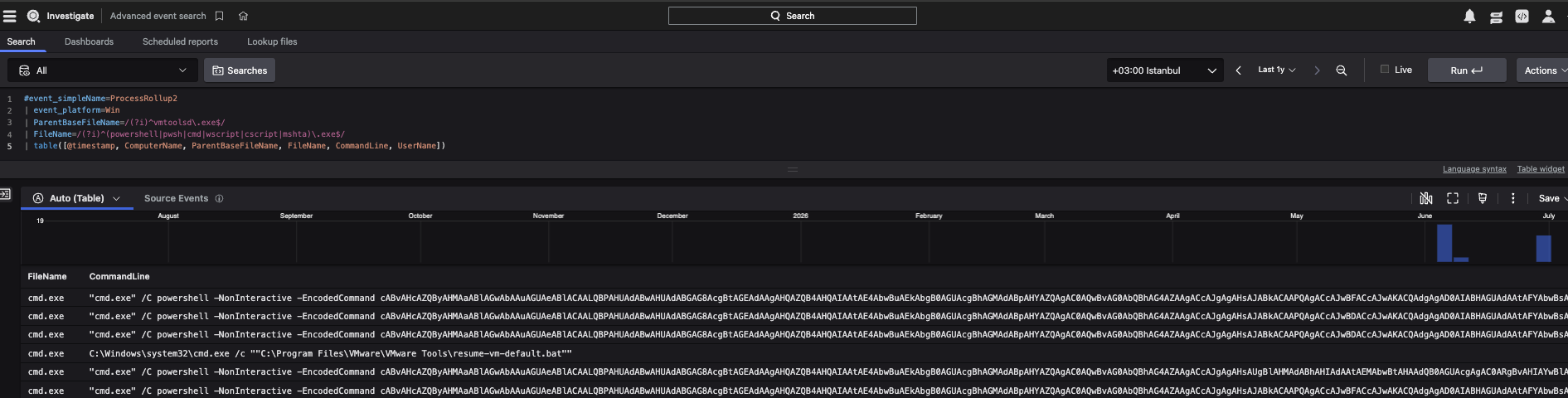
On the CrowdStrike side, this scenario should be addressed in two fundamental layers. The first layer is the endpoint telemetry data collected by the Falcon Sensor running on the guest VM. At this point the most critical signal is that the ParentBaseFileName field in ProcessRollup2 events is vmtoolsd.exe, and unexpected child processes such as powershell.exe, cmd.exe, pwsh.exe, wscript.exe, cscript.exe, mshta.exe, rundll32.exe, regsvr32.exe, or msiexec.exe are launched under this parent process.
The second layer is correlating vCenter and ESXi logs by ingesting them into Falcon Next-Gen SIEM / LogScale. Within vpxd.log, vpxa.log, and hostd.log, the Guest Operations activities, the relevant user or service account, the operation ID, and the API method information can be examined. The strongest detection approach is to correlate the GuestOps activities on vCenter/ESXi with the parent-child process telemetry of vmtoolsd.exe inside the guest VM within the same time window.
On Falcon Advanced Event Search / LogScale, a baseline hunting query can be constructed as shown below; in addition, adding it as a hunting query and running it as a continuous search internally can increase visibility:
Detection with Hunting Query
If, at the end of testing, unexpected child processes are observed being logged on Falcon under the vmtoolsd.exe parent process, visibility is confirmed. The absence of a native detection does not mean that the activity is not seen by Falcon. Benign commands often may not reach the prevention or detection threshold. For this reason, behavioral detection must be developed with organization-specific Custom IOA or SIEM correlation rules.

Figure 3 — Falcon Process Tree / powershell.exe under vmtoolsd.exe
CrowdStrike Custom IOA Recommendation
For this scenario, the recommended Custom IOA should be built with the Process Creation type on the Windows platform. In the initial phase, it is recommended to test the rule not directly in prevention mode, but in detect-only or monitor mode on a pilot host group. A false positive analysis should be conducted on Event Search output from the last 7-30 days; backup systems, VMware automation accounts, VCF, SDDC Manager, Azure Guest Management, or similar service accounts that legitimately use GuestOps should also be evaluated separately during the tuning process.
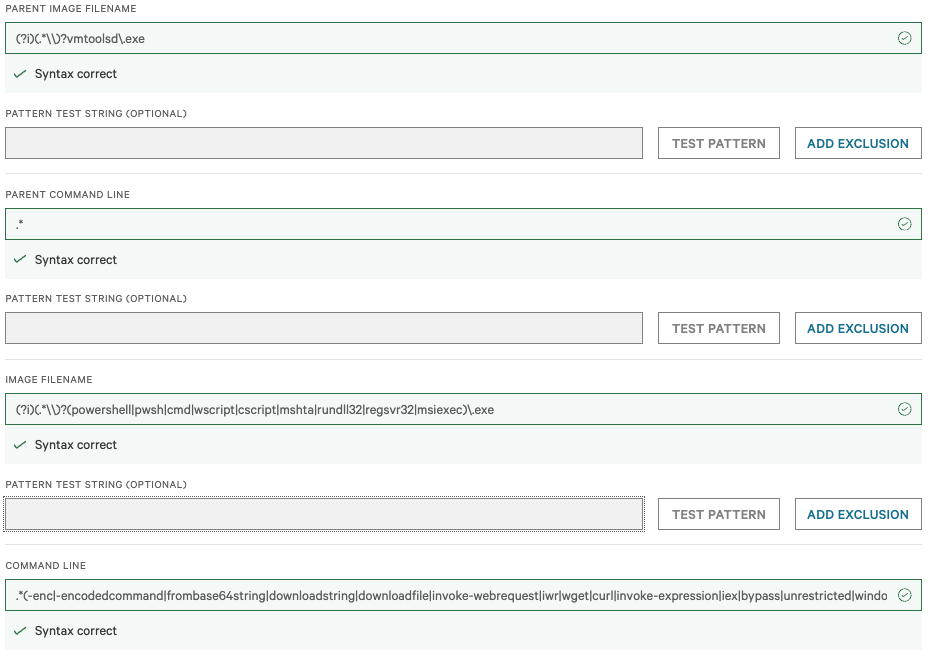
Recommended starting rule:
Parent Image Filename:
Image Filename:
For a higher-confidence command line pattern, the following 2 regex expressions can be used:
This pattern can be used to catch a broader range of suspicious activity such as encoded commands, download behavior, use of risky paths, and file deletion in child processes started under vmtoolsd.exe. It is more comprehensive, but the false positive rate may be slightly higher compared with the second rule.
This pattern more specifically targets PowerShell abuse behaviors. It is better suited for catching PowerShell-based attack or script execution scenarios such as -enc, -nop, -noprofile, bypass, invoke-webrequest, iwr, downloadstring, iex, and http/https. With this structure, not only script interpreter or trusted binary activity launched under vmtoolsd.exe is monitored, but also riskier command line patterns such as encoded commands, download behavior, Temp/AppData usage, and file deletion.
Conclusion
vmtoolsd.exe is not a malicious process on its own; it is a legitimate and necessary component of VMware Tools. However, the launching of processes such as powershell.exe, cmd.exe, mshta.exe, rundll32.exe, or similar under the vmtoolsd.exe parent process via Guest Operations produces a high-value detection signal — especially when combined with an unexpected user account, unusual hours, external connections, file deletion/modification, or the use of Temp/AppData paths.
For this reason, looking only at endpoint telemetry on CrowdStrike Falcon is not sufficient. The most effective approach is to correlate the Falcon Sensor data on the guest VM with vCenter/ESXi logs on the Falcon Next-Gen SIEM / LogScale side. This way, GuestOps-driven command execution behavior can be made visible end-to-end from both the endpoint and the virtualization layer perspectives.
Burak ÖRT
MDR Team Leader
This article is based on controlled testing performed in a real CrowdStrike Falcon environment and on the recommended Custom IOA outputs.